
Coding
Learn how to use Ansible to automate the maintenance of a security warning banner in Zabbix. Step-by-step instructions, CLI examples, and best practices for ensuring

Comprehensive step-by-step guide to migrate Zabbix 6.4 to Zabbix 7.0 LTS for MySQL and PostgreSQL. Includes pre-checks, database commands, schema upgrades, and rollback instructions.
Upgrading your Zabbix monitoring platform from version 6.4 to version 7.0 LTS is a strategic move that ensures long-term support, improved scalability, and enhanced performance. Active support for Zabbix 6.4 ended on June 30, 2024. The 7.0 LTS release (Long-Term Support) is designed for stability and enterprise use, providing five years of maintenance and security updates.
This guide walks you step-by-step through a production-grade migration process for both MySQL/MariaDB and PostgreSQL backends. It is concise and includes command-line examples, upgrade workflows, and validation steps.
| Benefit | Description |
|---|---|
| Zabbix 7.0 LTS Support | Supported until June 2029 — ideal for stable environments. |
| Improved Polling Engine | Asynchronous pollers improve scalability and performance. |
| Enhanced UI and APIs | Faster interface, updated widgets, extended REST API. |
| Security and Compliance | Updated encryption libraries and password handling. |
| Native PHP 8+ Compatibility | Frontend now requires PHP 8.0 or newer. |
🟢 Environment Audit |
Before starting the migration, collect key information about your Zabbix environment:
| Component | Command/Location | Notes |
|---|---|---|
| Zabbix Version | zabbix_server -V | Verify you’re running 6.4.x |
| OS | cat /etc/os-release | Supported: RHEL 9, Ubuntu 22.04+, Debian 12, etc. |
| Database | mysql -V or psql --version | MySQL 8+ or PostgreSQL 13+ recommended |
| PHP Version | php -v | Must be ≥ 8.0 |
| Free Disk Space | df -h | Ensure enough room for schema migration |
🟢 Backup Strategy |
A complete backup is mandatory before upgrading.
🔹Configuration Files |
Backup key configs:
sudo cp /etc/zabbix/zabbix_server.conf /etc/zabbix/zabbix_server.conf.bak
sudo cp -r /etc/zabbix/web/ /etc/zabbix/web_backup/
sudo cp -r /usr/lib/zabbix/externalscripts /usr/lib/zabbix/externalscripts_backup
🔹Database Backups |
mysqldump -u root -p --single-transaction --quick --routines zabbix > /backup/zabbix_mysql_6.4.sql
sudo -u postgres pg_dump -Fc zabbix > /backup/zabbix_pg_6.4.dump
The -Fc flag creates a compressed, restorable dump that works with pg_restore.
If your Zabbix server runs in a VM or container, take a full system snapshot.
| Component | Zabbix 6.4 | Zabbix 7.0 LTS | Required Action |
|---|---|---|---|
| PHP | 7.4–8.2 | 8.0–8.3 | Upgrade if below 8.0 |
| MySQL | ≥ 5.7 | ≥ 8.0.30 | Upgrade MySQL if older |
| PostgreSQL | ≥ 12 | ≥ 13 | Upgrade PostgreSQL if needed |
| OS | RHEL 8/Ubuntu 20.04 | RHEL 9/Ubuntu 22.04+ | Update if unsupported |
🟢 Step 1: Schedule Downtime |
Notify users and schedule a maintenance window. The upgrade will briefly stop all monitoring and alerting.
🟢 Step 2: Stop Zabbix Services |
sudo systemctl stop zabbix-server zabbix-agent zabbix-proxy
sudo systemctl stop nginx php-fpm # Or Apache (httpd), if applicable
🟢 Step 3: Update Repositories |
					rpm -Uvh https://repo.zabbix.com/zabbix/7.0/rhel/9/x86_64/zabbix-release-7.0-5.el9.noarch.rpm
dnf clean all
dnf upgrade zabbix-server-mysql zabbix-server-pgsql zabbix-frontend-php zabbix-agent
					wget https://repo.zabbix.com/zabbix/7.0/ubuntu/pool/main/z/zabbix-release/zabbix-release_7.0-5+ubuntu22.04_all.deb
sudo dpkg -i zabbix-release_7.0-5+ubuntu22.04_all.deb
sudo apt update
sudo apt install --only-upgrade zabbix-server-mysql zabbix-server-pgsql zabbix-frontend-php zabbix-agent
⚠️ NOTE: Choose either the MySQL or PostgreSQL server package, matching your backend. |
🟢 Step 4: Verify Configuration |
Edit /etc/zabbix/zabbix_server.conf to ensure correct database parameters. Examples:
					DBHost=localhost
DBName=zabbix
DBUser=zabbix
DBPassword=strongpassword
					DBHost=localhost
DBName=zabbix
DBUser=zabbix
DBPassword=strongpassword
🟢 Step 5: Start and Run Schema Upgrade |
Start the Zabbix server. It will automatically detect and upgrade the schema.
sudo systemctl start zabbix-server
tail -f /var/log/zabbix/zabbix_server.log
Look for entries like:
					upgrading database from version 06040000 to 07000000
database upgrade successfully completed
🟢 Step 6: Start Remaining Services |
sudo systemctl start php-fpm nginx
sudo systemctl start zabbix-agent
sudo systemctl start zabbix-proxy
Then, log in to the frontend and verify the version at the bottom of the home page:
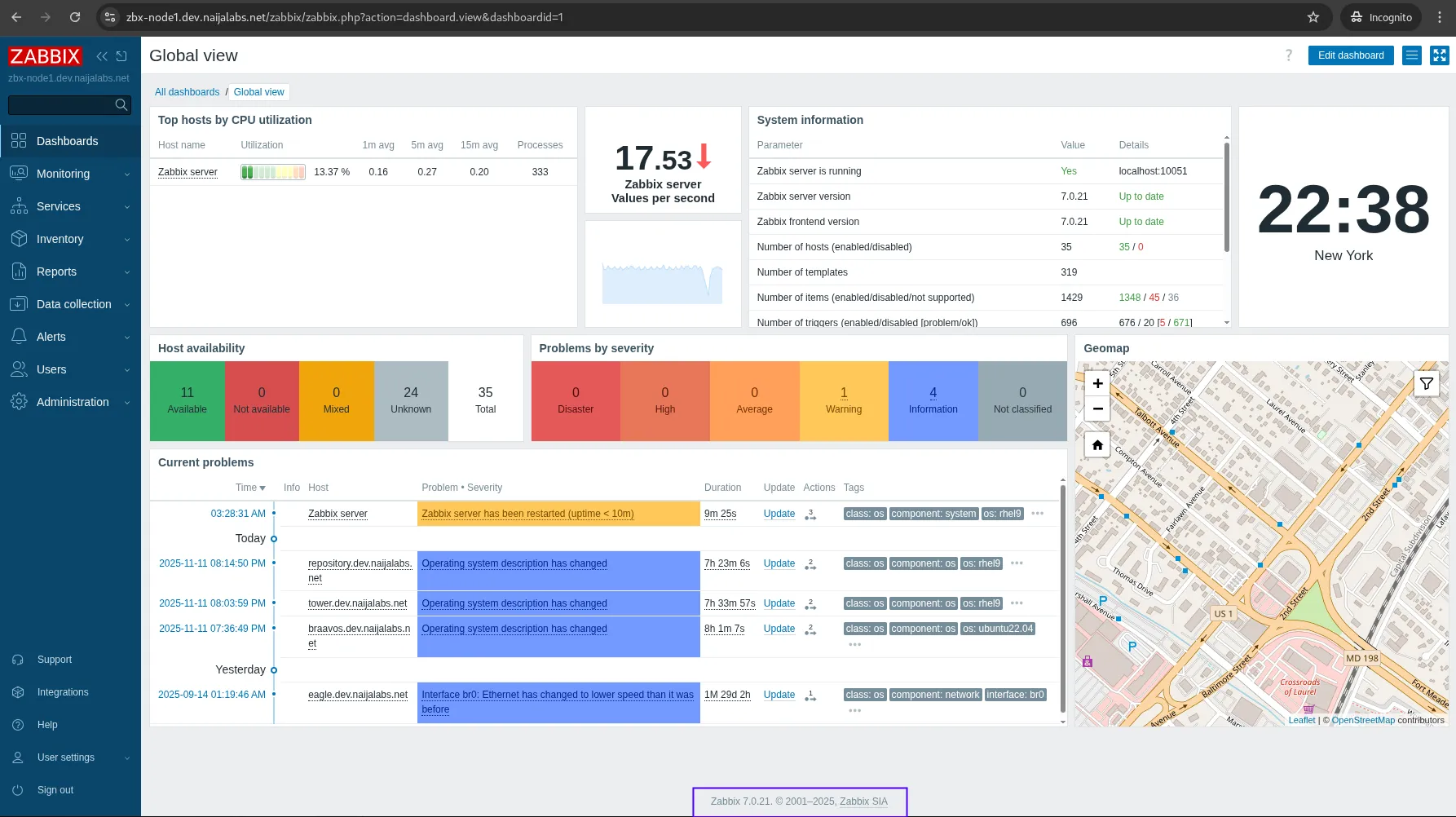
Photo by admingeek from Infotechys
🟢 MySQL / MariaDB Notes |
|
|
ALTER DATABASE zabbix CHARACTER SET utf8mb4 COLLATE utf8mb4_bin;
|
🟢 PostgreSQL Notes |
|
|
|
|
sudo -u postgres vacuumdb --all --analyze-in-stages
🟢 Validate Components |
| Task | Verification |
|---|---|
| Frontend | Login and check dashboard loads |
| Proxies | zabbix_proxy.log shows “active data sender started” |
| Agents | Data items updating within 5 min |
| Alerting | Send test email or webhook |
🟢 Update Templates |
Zabbix 7.0 introduces new official templates. Replace or update legacy 6.4 templates.
Import templates via UI (Data Collection → Templates → Import) or API:
zabbix_import --server=https://zabbix.example.com --user=Admin --password=zabbix --template template_7.0_host.xml
🟢 Performance Tuning |
After confirming system health, tune key parameters in /etc/zabbix/zabbix_server.conf:
| Parameter | Default | Recommended for Large Setups |
|---|---|---|
| StartPollers | 5 | 20–50 |
| StartTrappers | 5 | 20 |
| StartHistoryPollers | 5 | 10–20 |
| CacheSize | 8M | 64M+ |
| HistoryCacheSize | 16M | 128M+ |
🟢 Cleanup and Optimize |
Remove outdated packages:
sudo apt autoremove # Ubuntu/Debian
sudo dnf autoremove # RHEL 8+ or higher
Check for deprecated custom scripts and verify all modules compile correctly with Zabbix 7.0.
🟢 Backup New Version |
Once the migration is successful, create a fresh backup of the new environment.
If the upgrade fails or regression occurs:
|
sudo systemctl stop zabbix-server zabbix-agent zabbix-proxy
|
MySQL:
mysql -u root -p zabbix < /backup/zabbix_mysql_6.4.sql
PostgreSQL:
sudo -u postgres pg_restore -d zabbix /backup/zabbix_pg_6.4.dump
|
|
| Task | Status |
|---|---|
| Backup database and configs | ☐ |
| Verify PHP 8+ and OS support | ☐ |
| Stop Zabbix services | ☐ |
| Upgrade repositories and packages | ☐ |
| Verify DB connection config | ☐ |
| Run schema upgrade | ☐ |
| Validate frontend and proxies | ☐ |
| Update templates | ☐ |
| Tune performance | ☐ |
| Create post-upgrade backup | ☐ |
| Issue | Cause | Fix |
|---|---|---|
| Server fails to start | PHP or DB mismatch | Verify PHP 8+ and DB credentials |
| Schema upgrade stalled | DB locks or large tables | Stop and resume, ensure DB storage is sufficient |
| Frontend shows blank page | PHP modules missing | Install php-xml, php-bcmath, php-gd |
| High CPU after upgrade | Cache too small | Increase CacheSize and HistoryCacheSize |
Migrating from Zabbix 6.4 to Zabbix 7.0 LTS delivers a faster, more stable, and future-ready monitoring platform. With built-in schema upgrades and LTS support, the transition is straightforward for both MySQL and PostgreSQL environments—provided you prepare carefully and follow best practices.
After upgrading:
|
|
|
When executed properly, this migration ensures continuity and readiness for years of reliable operations.
Did you find this article helpful? Your feedback is invaluable to us! Feel free to share this post with those who may benefit, and let us know your thoughts in the comments section below.
Learn how to use Ansible to automate the maintenance of a security warning banner in Zabbix. Step-by-step instructions, CLI examples, and best practices for ensuring

Learn how to enable Gmail notifications in Zabbix with our step-by-step guide. Improve your IT monitoring by ensuring timely alerts and effective incident management. Perfect
Learn how to configure the timezone in Zabbix for accurate monitoring and reporting. Follow our step-by-step guide to set the system timezone, update PHP settings,